SKU: OT5863 Número de artículo: XR356 EAN: 8720618489425

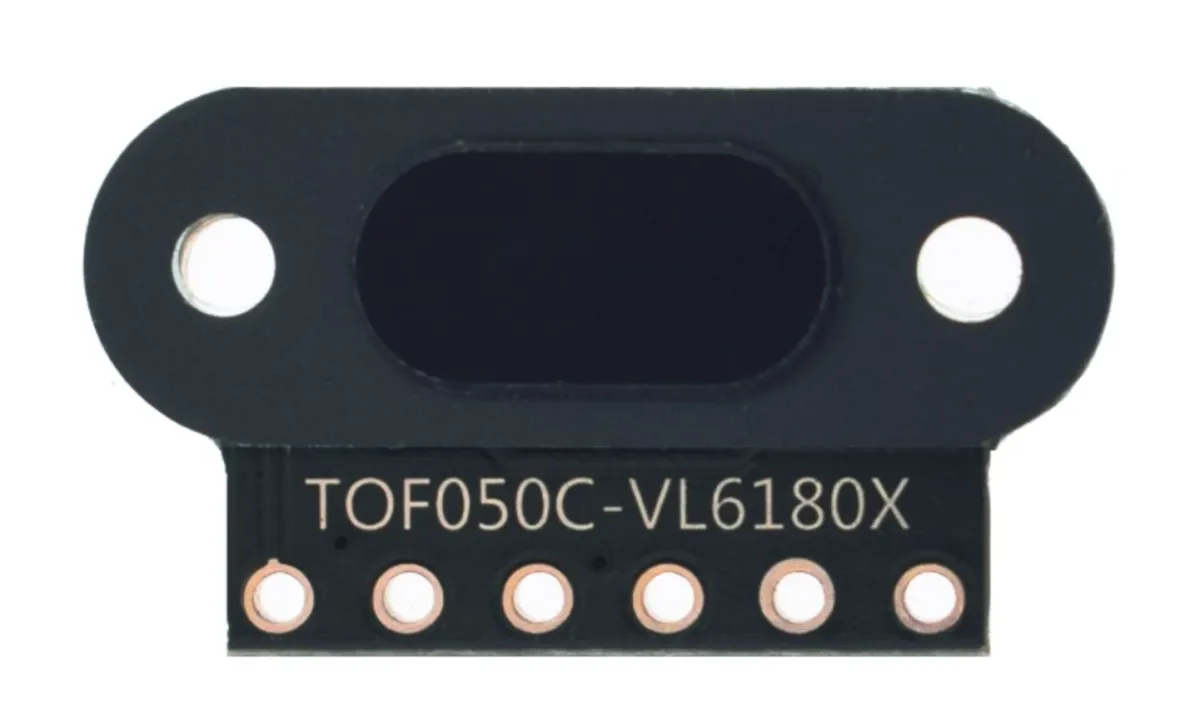
Módulo mini sensor láser de distancia con una precisión de 1mm y gran alcance.
Modelo: TOF050C-VL6180X
Voltaje: 3V hasta 5 V
Consumo de corriente: 40 mA (máx)
Distancia: 3cm hasta 50cm
Conexiones:
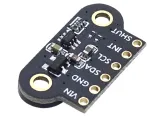
- VIN
- GND
- SDA
- SCL
- INT
- SHUT
Comunicación: el protocolo de comunicación I2C (totalmente compatible con sistema de 3-5 v)
Adecuado para Arduino, ESP8266 y ESP32. Funciona bien con la biblioteca Adafruit_VL6180X.
Es posible usar varios sensores en 1 línea I2C, ya que los sensores pueden recibir un dirección I2C por software.
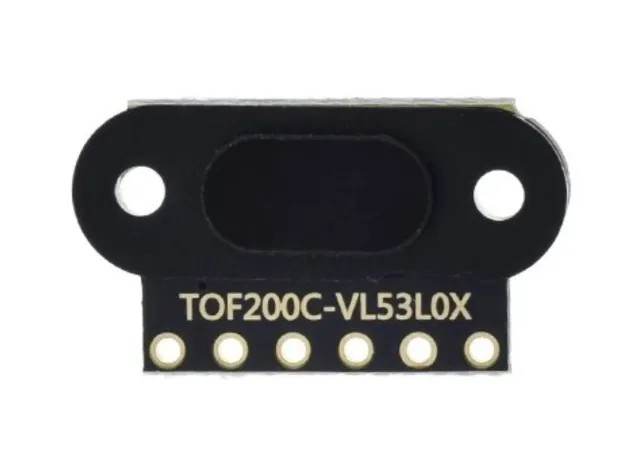
El sensor láser Time Of Flight VL53L0X es un sensor muy preciso y fiable que puede utilizarse para una amplia gama de aplicaciones, incluyendo medición de distancia, detección de movimiento y navegación.
Una de las principales ventajas de este sensor es su precisión. El sensor utiliza tecnología láser para medir la distancia a un objeto, lo que proporciona un resultado mucho más preciso que, por ejemplo, un sensor infrarrojo. Esto hace que el sensor sea adecuado, por ejemplo, para su uso en drones, automatización industrial y robots.
Además, el sensor también es muy fácil de usar. Es compatible con una amplia gama de plataformas de microcontroladores, incluyendo Arduino, Raspberry Pi y STM32, y hay muchos ejemplos y bibliotecas disponibles para ayudarle a integrar el sensor en su proyecto.
Por último, el sensor también es muy pequeño y ligero, lo que facilita su integración en una amplia gama de aplicaciones. Los 2 orificios para tornillos también facilitan mucho fijar este sensor de forma segura.
Dimensiones
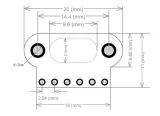
Longitud: 1,3cm
Anchura: 1,04cm
Altura: 0,32cm

Al reproducirlo, se carga el vídeo de YouTube.
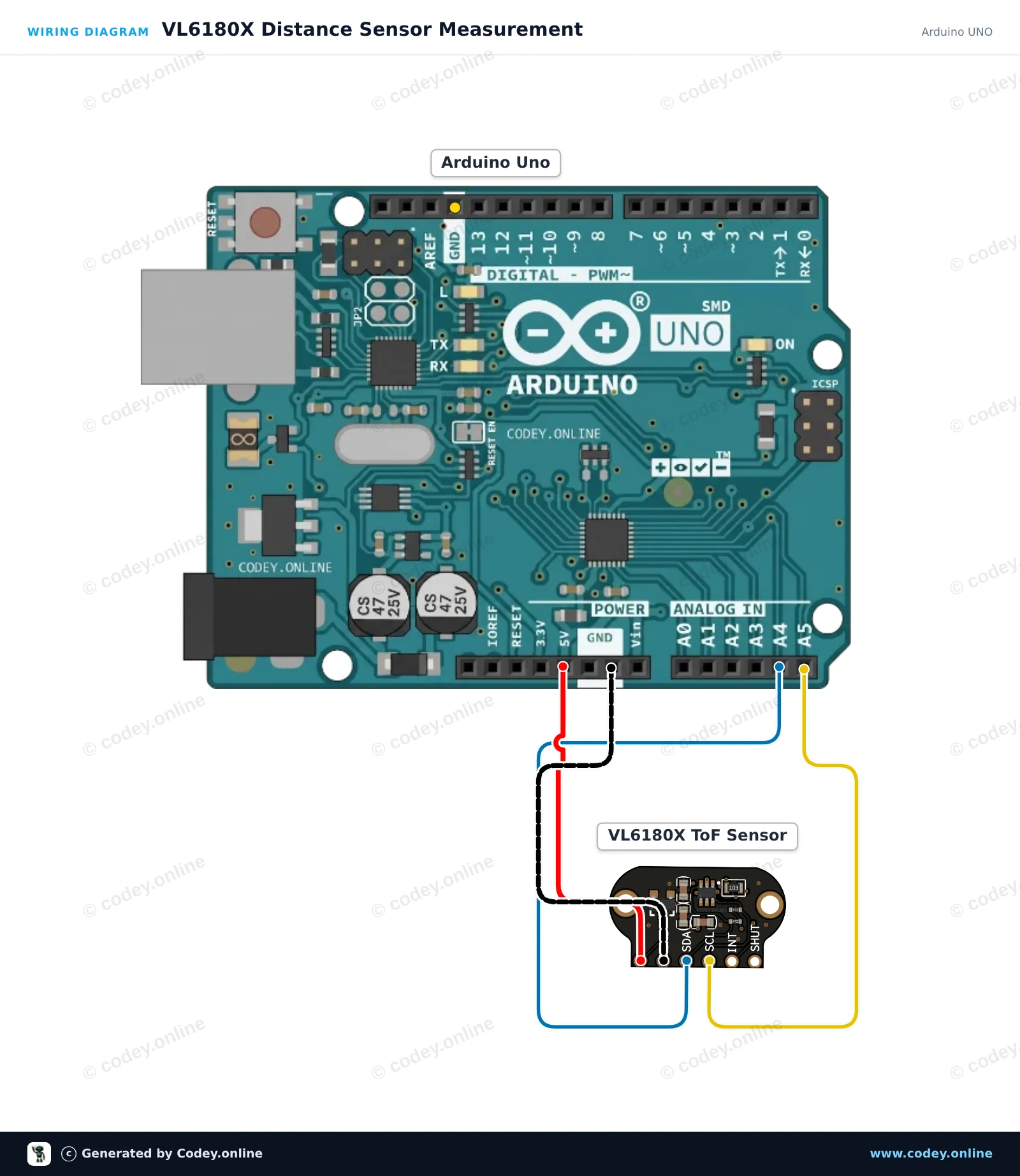
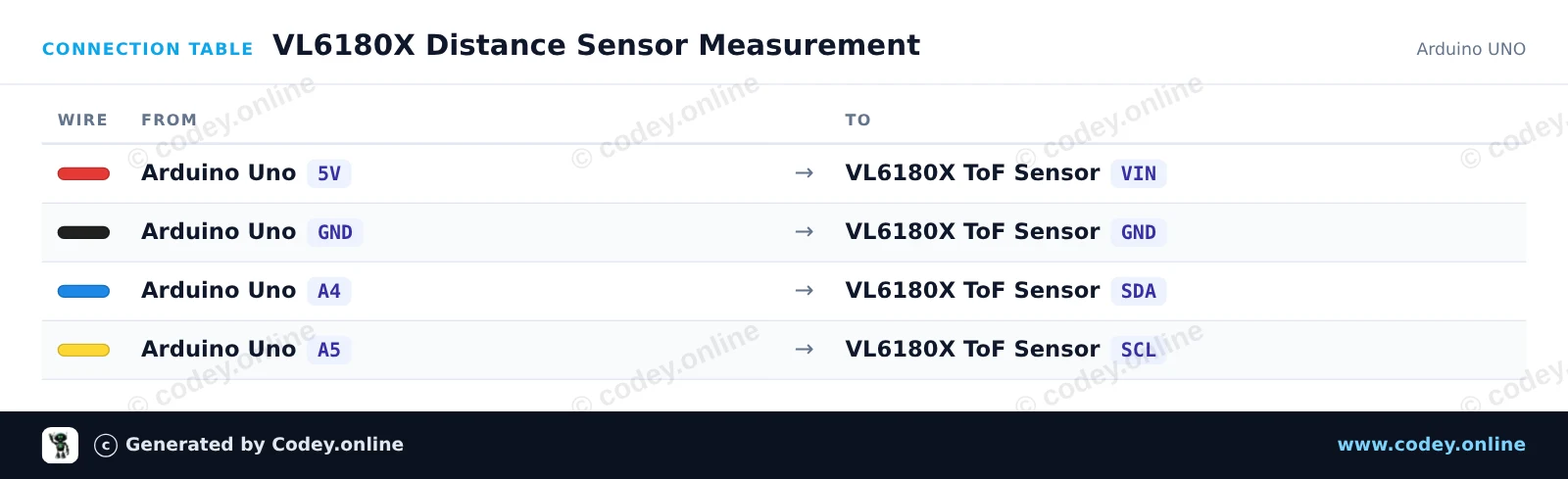
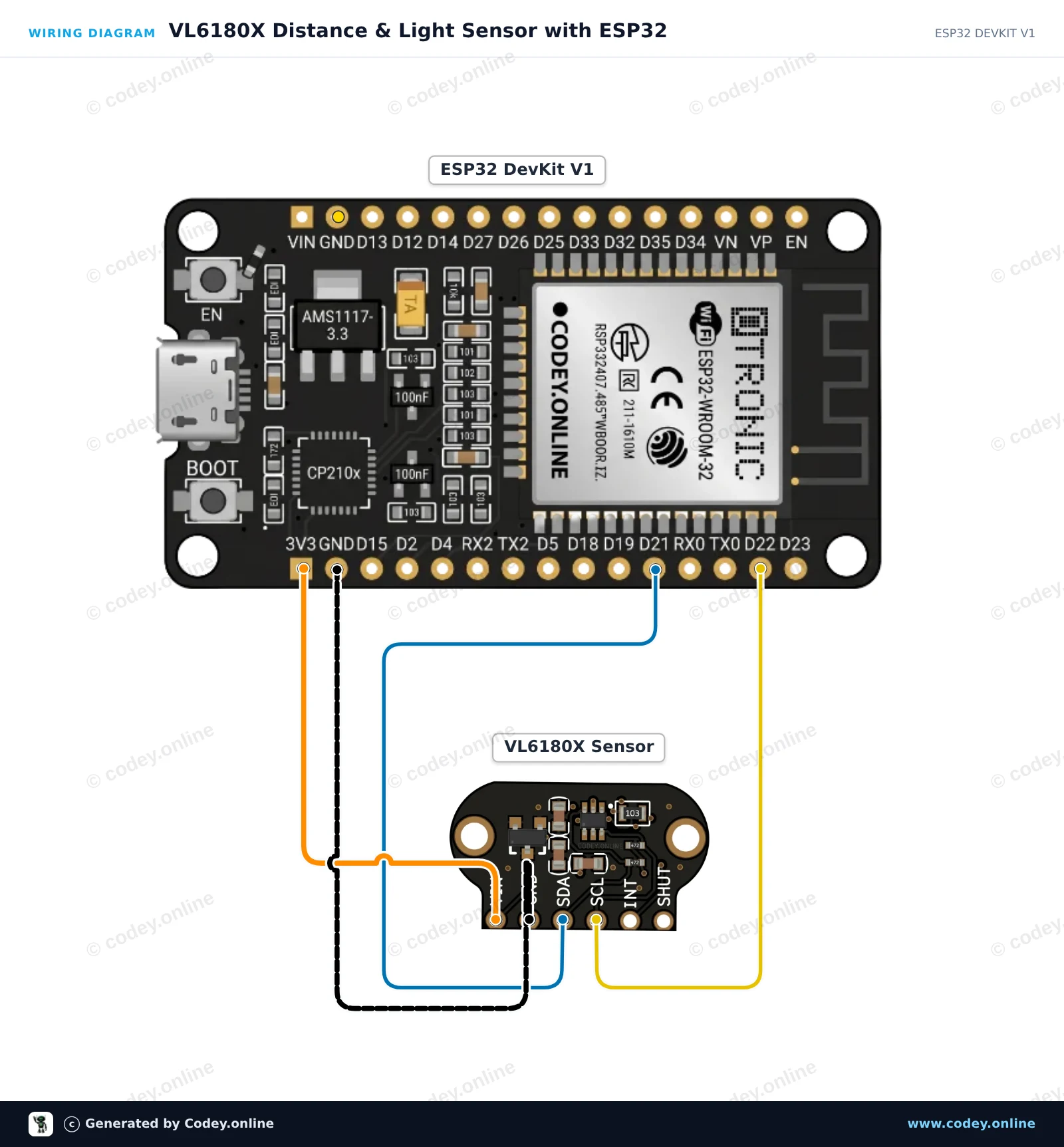
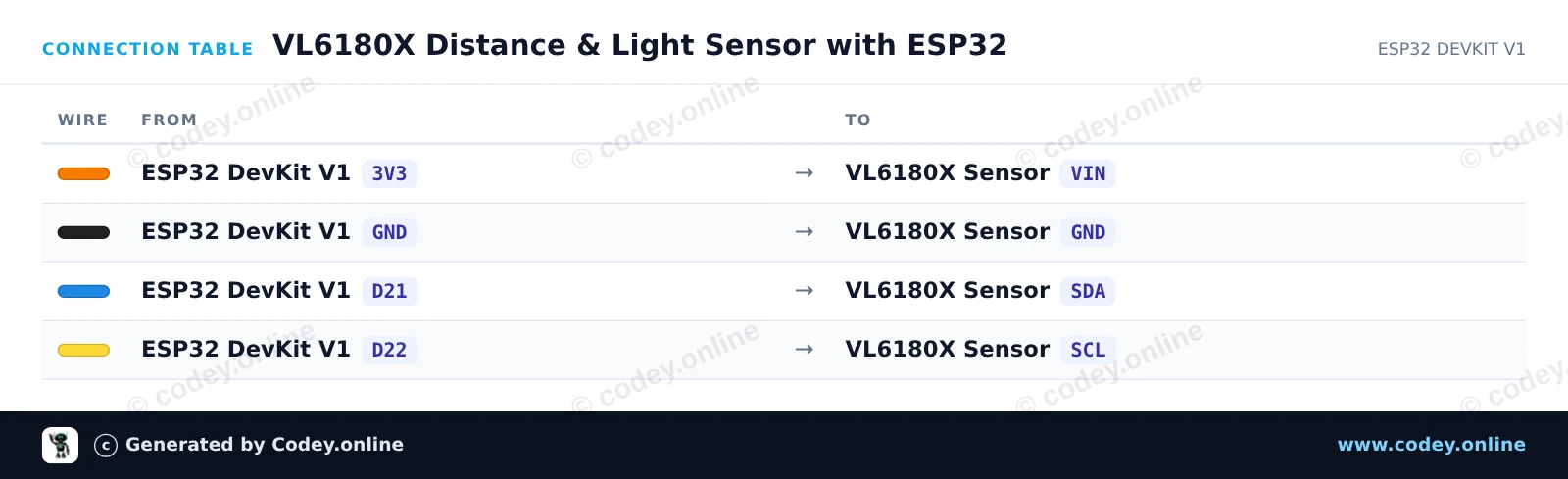
Así conectas el TOF050C-VL6180X Sensor de distancia Time-Of-Flight de alta precisión a un Arduino UNO o ESP32, con un sketch de ejemplo que puedes subir directamente.
Este proyecto mide con precisión distancias de corto alcance (hasta ~200mm) usando el sensor Time-of-Flight VL6180X mediante I2C. Conecta el sensor a la alimentación y a los pines I2C, luego abre el Monitor Serie a 115200 baud para ver las mediciones de distancia en milímetros en tiempo real.
/*
 * ==================================================================
 *  Generated by Codey.online  —  https://www.codey.online
 * ==================================================================
 *  Project   : VL6180X Distance Sensor Measurement
 *  Board     : Arduino UNO (arduino:avr:uno)
 *  Parts     : TOF050C-VL6180X Distance Sensor Time-Of-Flight high precision
 *  Libraries : Adafruit_VL6180X 1.4.4
 *
 *  Codey Online is an AI-powered browser IDE for Arduino and ESP32.
 *  Describe your project and Codey writes the code, draws the wiring
 *  diagram and uploads it to your board, straight from the browser.
 *  This code is free to use, modify and share, without warranty.
 * ==================================================================
 */

#include <Wire.h>
#include <Adafruit_VL6180X.h>

Adafruit_VL6180X vl = Adafruit_VL6180X();

void setup() {
  Serial.begin(115200);
  while (!Serial) { delay(1); }

  Serial.println(F("Initializing VL6180X sensor..."));
  if (!vl.begin()) {
    Serial.println(F("Failed to find VL6180X sensor! Check wiring."));
    while (1);
  }
  Serial.println(F("VL6180X sensor ready!"));
}

void loop() {
  uint8_t range = vl.readRange();
  uint8_t status = vl.readRangeStatus();

  if (status == VL6180X_ERROR_NONE) {
    Serial.print(F("Distance: "));
    Serial.print(range);
    Serial.println(F(" mm"));
  } else {
    if (status >= VL6180X_ERROR_SYSERR_1 && status <= VL6180X_ERROR_SYSERR_5) {
      Serial.println(F("System error"));
    } else if (status == VL6180X_ERROR_ECEFAIL) {
      Serial.println(F("ECE failure"));
    } else if (status == VL6180X_ERROR_NOCONVERGE) {
      Serial.println(F("No convergence"));
    } else if (status == VL6180X_ERROR_RANGEIGNORE) {
      Serial.println(F("Ignoring range"));
    } else if (status == VL6180X_ERROR_SNR) {
      Serial.println(F("Signal-to-Noise Ratio error"));
    } else if (status == VL6180X_ERROR_RAWUFLOW) {
      Serial.println(F("Raw reading underflow"));
    } else if (status == VL6180X_ERROR_RAWOFLOW) {
      Serial.println(F("Raw reading overflow"));
    } else if (status == VL6180X_ERROR_RANGEUFLOW) {
      Serial.println(F("Range reading underflow"));
    } else if (status == VL6180X_ERROR_RANGEOFLOW) {
      Serial.println(F("Out of range (>200mm)"));
    }
  }

  delay(200);
}Bibliotecas necesarias: Adafruit_VL6180X 1.4.4
Wiring diagram and example code generated by Codey.online — https://www.codey.online
Este proyecto mide la distancia de corto alcance (0–100 mm) y los niveles de luz ambiental usando el sensor Time-of-Flight TOF050C VL6180X por I2C. Conecta el sensor directamente al 3.3V del ESP32 y a los pines I2C predeterminados (GPIO 21 y 22). Abre el Serial Monitor a 115200 baud para ver en tiempo real las mediciones de distancia y lux ambiental.
/*
 * ==================================================================
 *  Generated by Codey.online  —  https://www.codey.online
 * ==================================================================
 *  Project   : VL6180X Distance & Light Sensor with ESP32
 *  Board     : ESP32 DEVKIT V1 (esp32:esp32:esp32doit-devkit-v1)
 *  Parts     : TOF050C-VL6180X Distance Sensor Time-Of-Flight high precision
 *  Libraries : Adafruit_VL6180X 1.4.4
 *
 *  Codey Online is an AI-powered browser IDE for Arduino and ESP32.
 *  Describe your project and Codey writes the code, draws the wiring
 *  diagram and uploads it to your board, straight from the browser.
 *  This code is free to use, modify and share, without warranty.
 * ==================================================================
 */

#include <Wire.h>
#include <Adafruit_VL6180X.h>

Adafruit_VL6180X vl = Adafruit_VL6180X();

void setup() {
  Serial.begin(115200);
  while (!Serial) delay(10);

  Serial.println("VL6180X Distance & Light Sensor Demo");

  Wire.begin(21, 22);

  if (!vl.begin()) {
    Serial.println("Failed to find VL6180X sensor! Check wiring.");
    while (1) delay(100);
  }

  Serial.println("VL6180X found and initialized!");
}

void loop() {
  float lux = vl.readLux(VL6180X_ALS_GAIN_5);
  uint8_t range = vl.readRange();
  uint8_t status = vl.readRangeStatus();

  Serial.print("Ambient Light: ");
  Serial.print(lux);
  Serial.print(" Lux | ");

  if (status == VL6180X_ERROR_NONE) {
    Serial.print("Distance: ");
    Serial.print(range);
    Serial.println(" mm");
  } else {
    Serial.print("Range Status Error (Code: ");
    Serial.print(status);
    Serial.println(")");
  }

  delay(200);
}Bibliotecas necesarias: Adafruit_VL6180X 1.4.4
Wiring diagram and example code generated by Codey.online — https://www.codey.online





 English
  Nederlands
  Frans
Frans  Deutsch
  Italiano
  Suomi
Suomi  Polski
  Dansk
Dansk  Ελληνικά
  Български
  Čeština
  Hrvatski
  Svenska
  Aileen