SKU: OT2020-D106 Número de artículo: AB081 EAN: 8455269820906

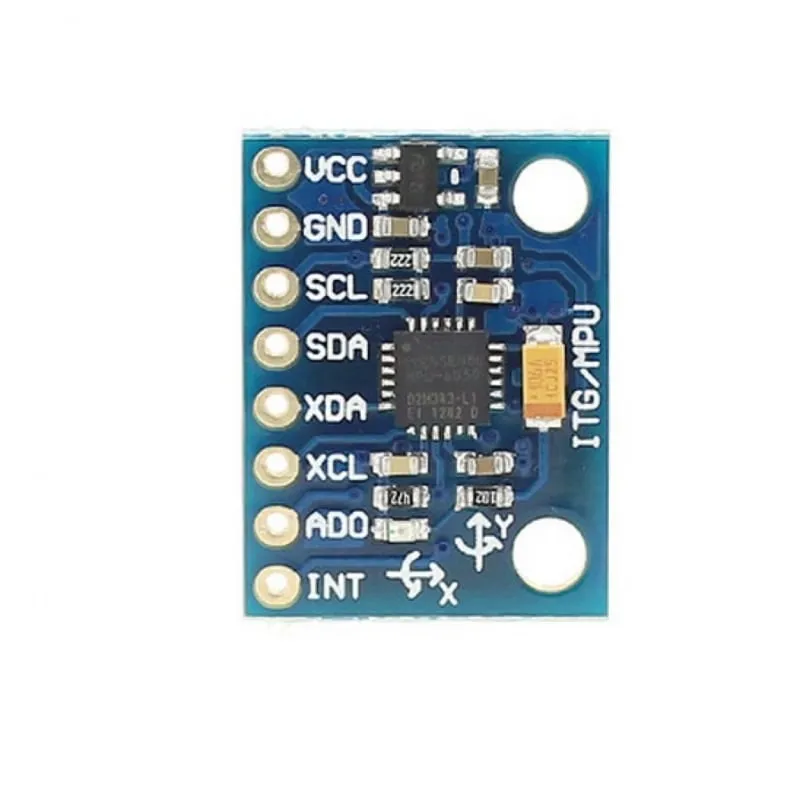
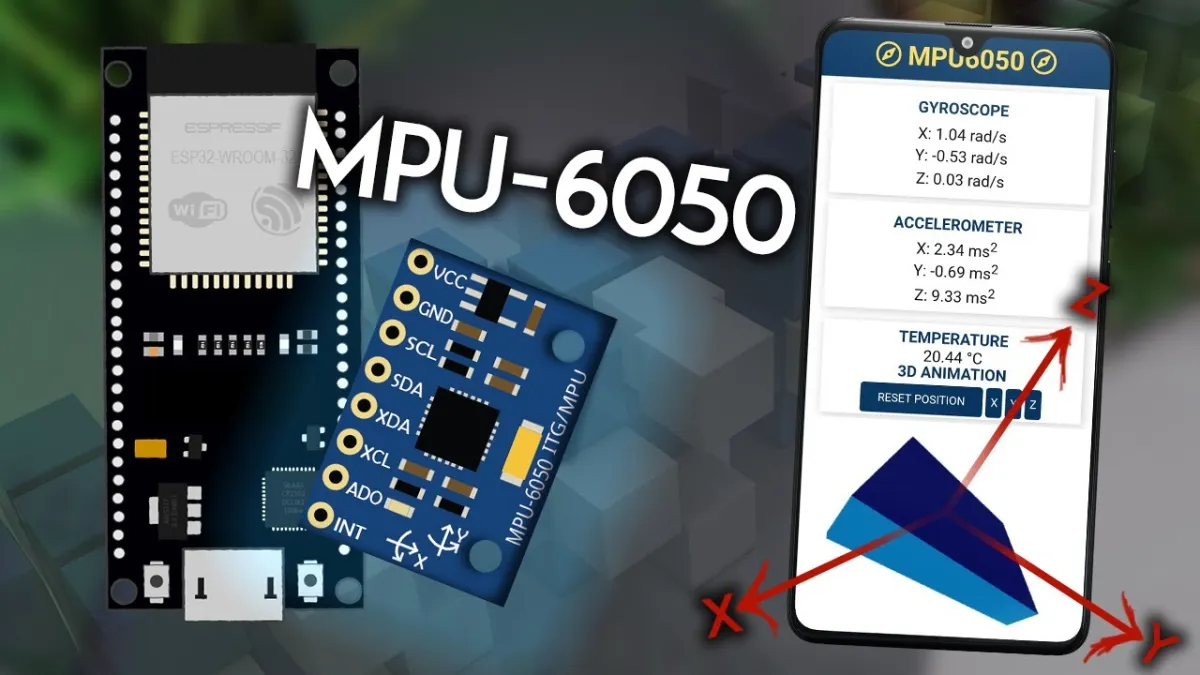
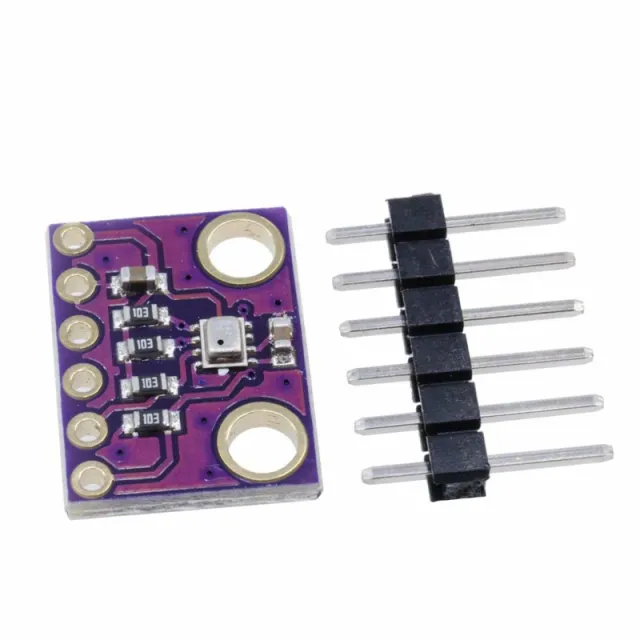
El módulo MPU-6050 integra un sensor de aceleración de 3 ejes y un giroscopio de 3 ejes. Además de un tamaño más reducido en comparación con soluciones individuales, este módulo también resuelve problemas de diferencias en sistemas multicomponente típicos.
La base de datos InvenSense integrada reduce el procesamiento complejo y ofrece un marco para el desarrollo de aplicaciones y API.
I2C con hasta 400 kHz está disponible para la transmisión de datos.
Datos técnicos
- Módulo MPU-6050 (giroscopio de tres ejes + aceleración de tres ejes)
- Alimentación: 3- 5 V (diferencial de baja tensión interno)
- Comunicación: el protocolo estándar de comunicación IIC
- Chip con convertidor AD de 16 bits integrado, salida de datos de 16 bits
- Rango del giroscopio: ±250, ±500, ±1000, ±2000 °/ s (16 bits)
- Rango de aceleración: ±2, ±4, ±8, ±16 g (16 bits)
- sensor de temperatura integrado
Ejemplos de uso
- Juegos de detección de movimiento
- realidad aumentada
- estabilización electrónica y óptica de imagen
Dimensiones
Longitud: 2,1cm
Anchura: 1,6cm
Altura: 0,34cm
Al reproducirlo, se carga el vídeo de YouTube.
Así conectas el Acelerómetro y giroscopio de aceleración I2C - MPU-6050 a un Arduino UNO o ESP32, con un sketch de ejemplo que puedes subir directamente.
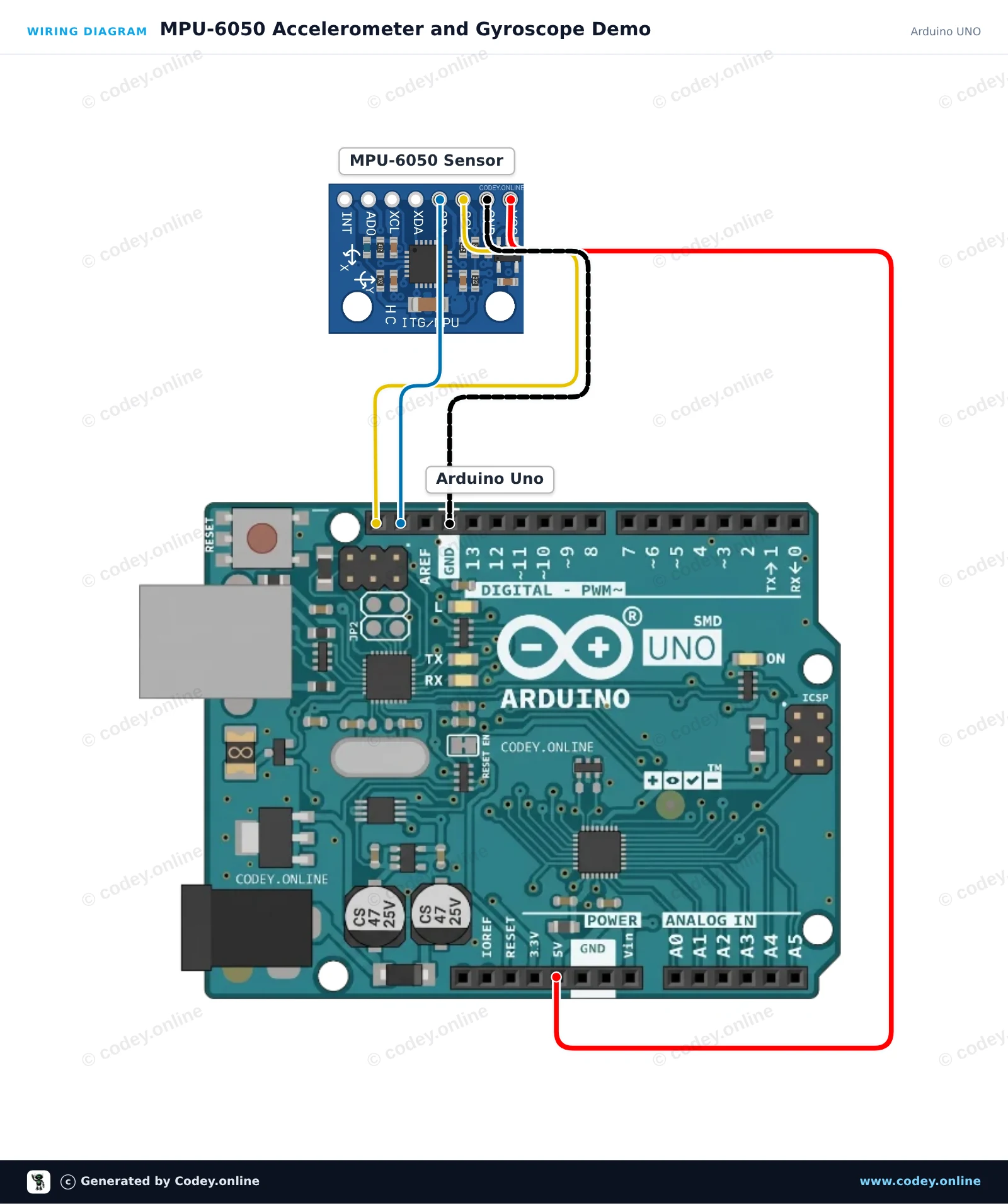
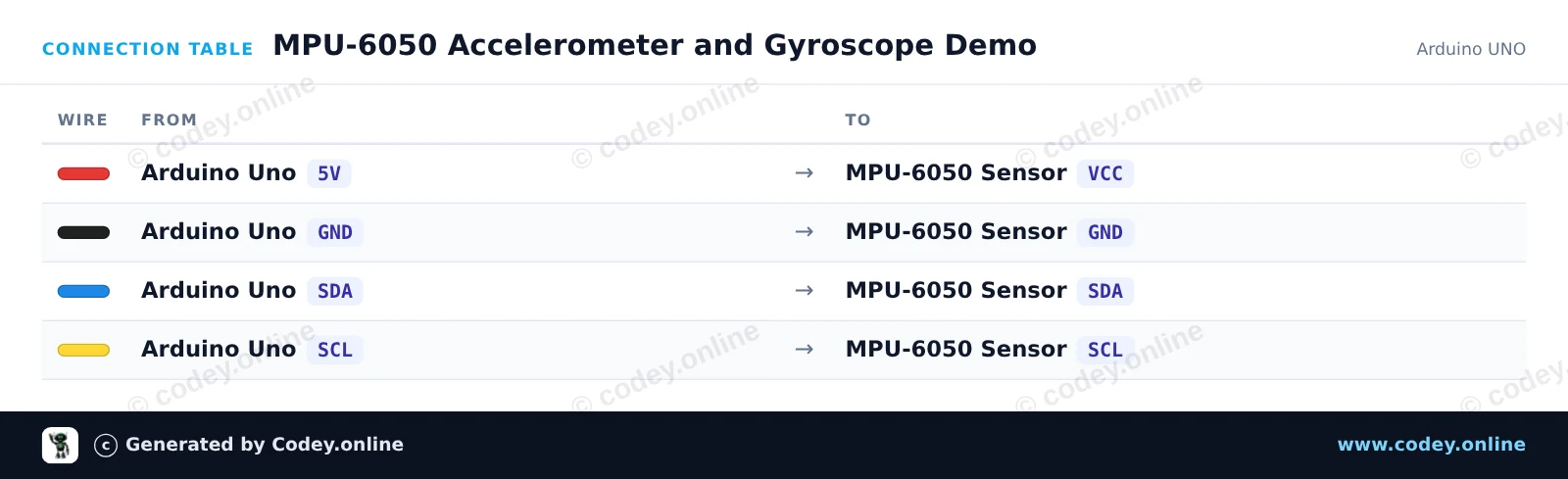
Este proyecto lee datos de aceleración y velocidad angular del sensor de seguimiento de movimiento de 6 ejes MPU-6050 mediante I2C. Conecta el sensor al Arduino Uno, carga el código y abre el Serial Monitor a 115200 baud para ver las lecturas de movimiento en tiempo real mientras inclinas y giras el módulo.
/*
 * ==================================================================
 *  Generated by Codey.online  —  https://www.codey.online
 * ==================================================================
 *  Project   : MPU-6050 Accelerometer and Gyroscope Demo
 *  Board     : Arduino UNO (arduino:avr:uno)
 *  Parts     : Accelerometer and Gyroscope I2C MPU-6050
 *  Libraries : Adafruit MPU6050 2.2.9, Adafruit Unified Sensor 1.1.15, Adafruit BusIO 1.17.4
 *
 *  Codey Online is an AI-powered browser IDE for Arduino and ESP32.
 *  Describe your project and Codey writes the code, draws the wiring
 *  diagram and uploads it to your board, straight from the browser.
 *  This code is free to use, modify and share, without warranty.
 * ==================================================================
 */

#include <Wire.h>
#include <Adafruit_MPU6050.h>
#include <Adafruit_Sensor.h>

Adafruit_MPU6050 mpu;

void setup() {
  Serial.begin(115200);
  while (!Serial) {
    delay(10);
  }

  Serial.println(F("Initializing MPU-6050..."));
  if (!mpu.begin()) {
    Serial.println(F("Failed to find MPU-6050 chip. Check connections!"));
    while (1) {
      delay(10);
    }
  }
  Serial.println(F("MPU-6050 initialized successfully!"));

  // Configure sensor ranges and filter bandwidth
  mpu.setAccelerometerRange(MPU6050_RANGE_8_G);
  mpu.setGyroRange(MPU6050_RANGE_500_DEG);
  mpu.setFilterBandwidth(MPU6050_BAND_21_HZ);
}

void loop() {
  sensors_event_t a, g, temp;
  mpu.getEvent(&a, &g, &temp);

  // Print acceleration in m/s^2
  Serial.print(F("Accel (m/s^2) X: "));
  Serial.print(a.acceleration.x, 2);
  Serial.print(F(", Y: "));
  Serial.print(a.acceleration.y, 2);
  Serial.print(F(", Z: "));
  Serial.print(a.acceleration.z, 2);

  // Print rotation rate in rad/s
  Serial.print(F(" | Gyro (rad/s) X: "));
  Serial.print(g.gyro.x, 2);
  Serial.print(F(", Y: "));
  Serial.print(g.gyro.y, 2);
  Serial.print(F(", Z: "));
  Serial.print(g.gyro.z, 2);

  // Print onboard temperature
  Serial.print(F(" | Temp: "));
  Serial.print(temp.temperature, 1);
  Serial.println(F(" C"));

  delay(500);
}Bibliotecas necesarias: Adafruit MPU6050 2.2.9, Adafruit Unified Sensor 1.1.15, Adafruit BusIO 1.17.4
Wiring diagram and example code generated by Codey.online — https://www.codey.online
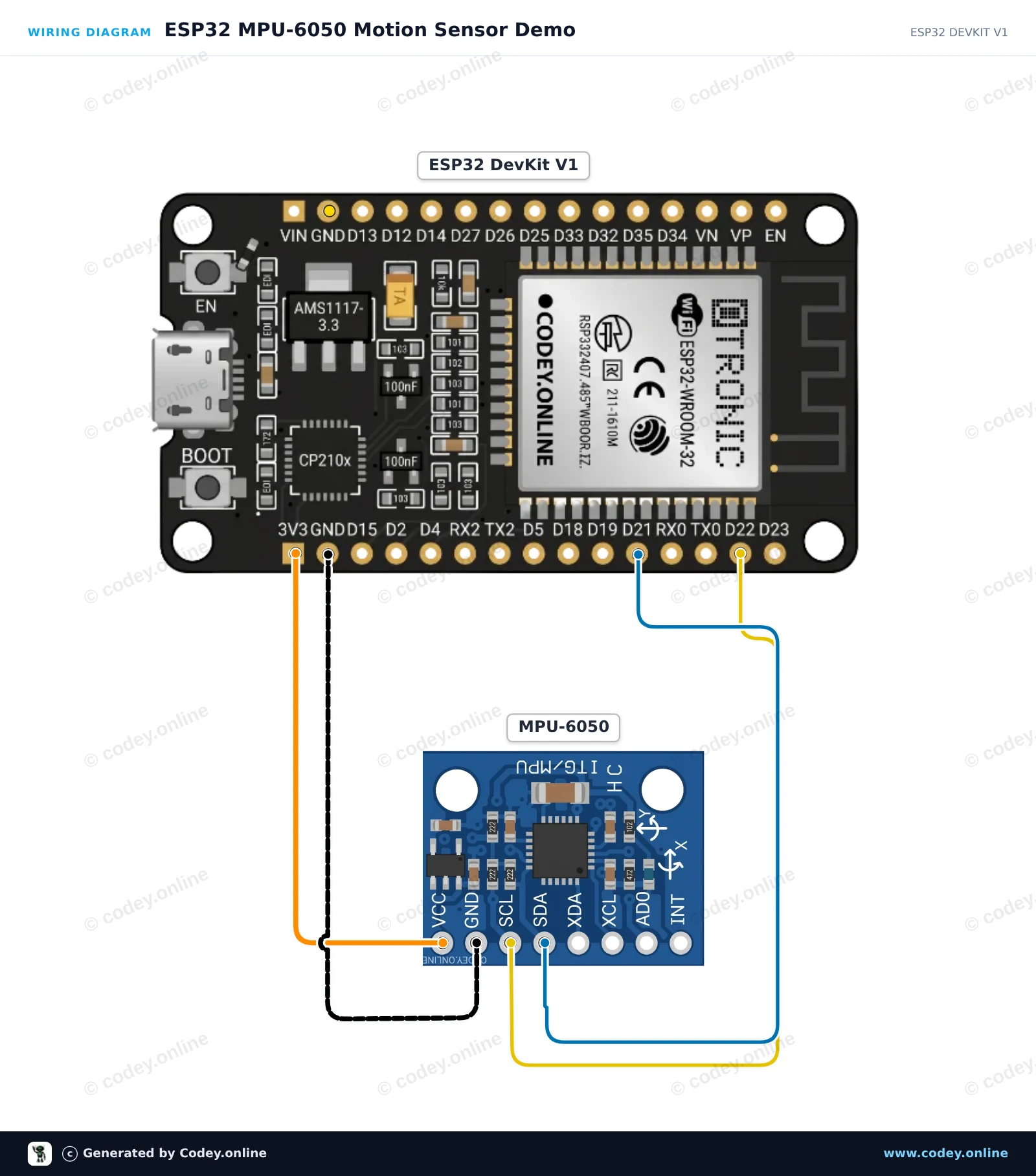
Este proyecto lee la aceleración de 3 ejes, la velocidad de rotación y la temperatura del sensor MPU-6050 mediante I2C. El ESP32 lee los datos del sensor a 10 Hz e imprime valores formateados en el Serial Monitor a 115200 baud. Abre el Serial Plotter para ver gráficos en vivo de los movimientos del sensor.
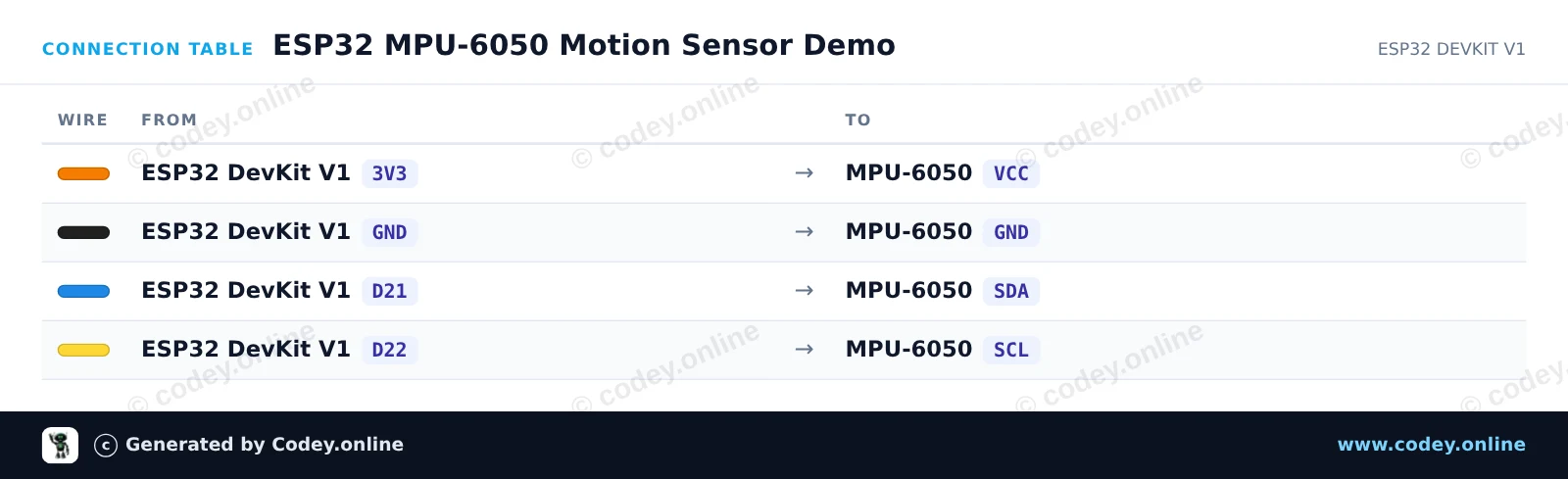
/*
 * ==================================================================
 *  Generated by Codey.online  —  https://www.codey.online
 * ==================================================================
 *  Project   : ESP32 MPU-6050 Motion Sensor Demo
 *  Board     : ESP32 DEVKIT V1 (esp32:esp32:esp32doit-devkit-v1)
 *  Parts     : Accelerometer and Gyroscope I2C MPU-6050
 *  Libraries : Adafruit MPU6050 2.2.9, Adafruit Unified Sensor 1.1.15
 *
 *  Codey Online is an AI-powered browser IDE for Arduino and ESP32.
 *  Describe your project and Codey writes the code, draws the wiring
 *  diagram and uploads it to your board, straight from the browser.
 *  This code is free to use, modify and share, without warranty.
 * ==================================================================
 */

#include <Adafruit_MPU6050.h>
#include <Adafruit_Sensor.h>
#include <Wire.h>

Adafruit_MPU6050 mpu;

void setup() {
  Serial.begin(115200);
  while (!Serial) delay(10);

  Serial.println("Initializing MPU-6050...");

  // Initialize I2C on ESP32 default pins: SDA (GPIO 21), SCL (GPIO 22)
  Wire.begin(21, 22);

  if (!mpu.begin(0x68, &Wire)) {
    Serial.println("Failed to find MPU-6050 chip!");
    while (1) {
      delay(10);
    }
  }

  Serial.println("MPU-6050 Found!");

  // Configure sensor ranges
  mpu.setAccelerometerRange(MPU6050_RANGE_8_G);
  mpu.setGyroRange(MPU6050_RANGE_500_DEG);
  mpu.setFilterBandwidth(MPU6050_BAND_21_HZ);

  delay(100);
}

void loop() {
  sensors_event_t a, g, temp;
  mpu.getEvent(&a, &g, &temp);

  Serial.print("Accel X: ");
  Serial.print(a.acceleration.x, 2);
  Serial.print(" m/s^2, Y: ");
  Serial.print(a.acceleration.y, 2);
  Serial.print(" m/s^2, Z: ");
  Serial.print(a.acceleration.z, 2);
  Serial.println(" m/s^2");

  Serial.print("Gyro X: ");
  Serial.print(g.gyro.x, 2);
  Serial.print(" rad/s, Y: ");
  Serial.print(g.gyro.y, 2);
  Serial.print(" rad/s, Z: ");
  Serial.print(g.gyro.z, 2);
  Serial.println(" rad/s");

  Serial.print("Temperature: ");
  Serial.print(temp.temperature, 1);
  Serial.println(" degC");
  Serial.println("------------------------------------");

  delay(500);
}Bibliotecas necesarias: Adafruit MPU6050 2.2.9, Adafruit Unified Sensor 1.1.15
Wiring diagram and example code generated by Codey.online — https://www.codey.online





 English
  Nederlands
  Frans
Frans  Deutsch
  Italiano
  Suomi
Suomi  Polski
  Dansk
Dansk  Ελληνικά
  Български
  Čeština
  Hrvatski
  Svenska
  Aileen