SKU: OT8822 Número de artículo: NA061 EAN: 8720828223482

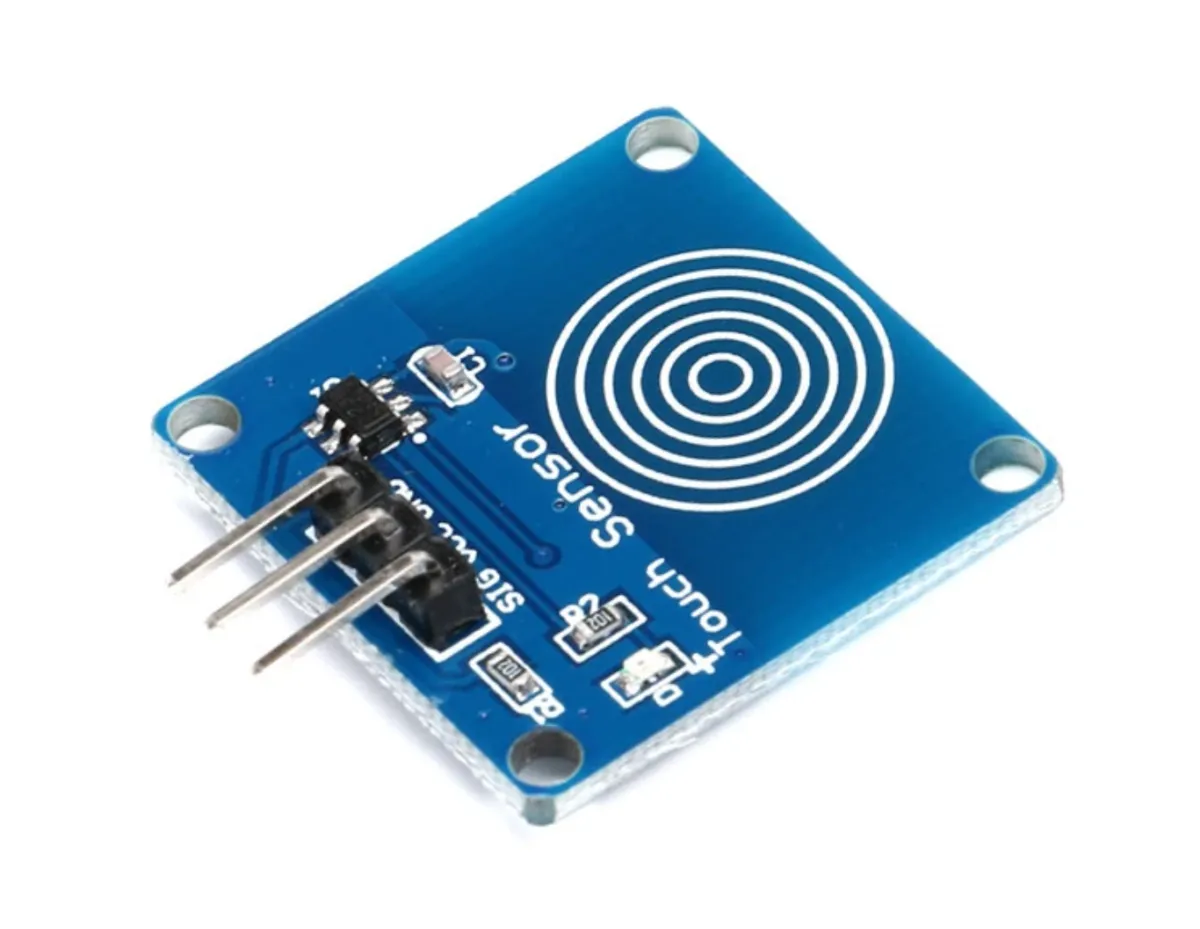
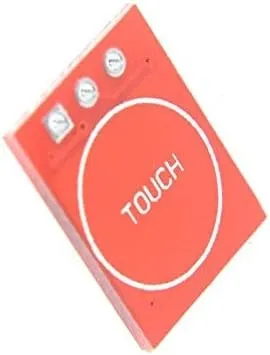
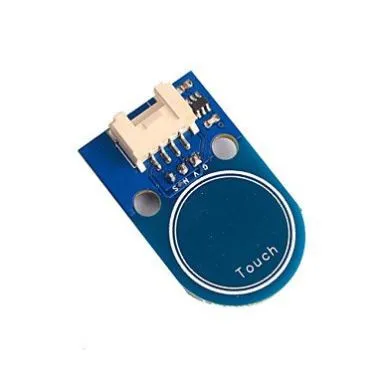
El TTP223B es un sensor táctil capacitivo que responde al contacto de un objeto o una persona sobre una superficie sensible. Este sensor está diseñado para diversas aplicaciones, como control táctil, interruptores y botones táctiles, y otros dispositivos activados por tacto.
Especificaciones técnicas del sensor táctil TTP223B:
El sensor táctil TTP223B dispone de un circuito antirrebote integrado para evitar interferencias. El consumo de corriente es bajo, menos de 1 mA en modo de espera. El sensor tiene una respuesta rápida de menos de 60 ms y una larga vida útil de más de 100.000 ciclos.
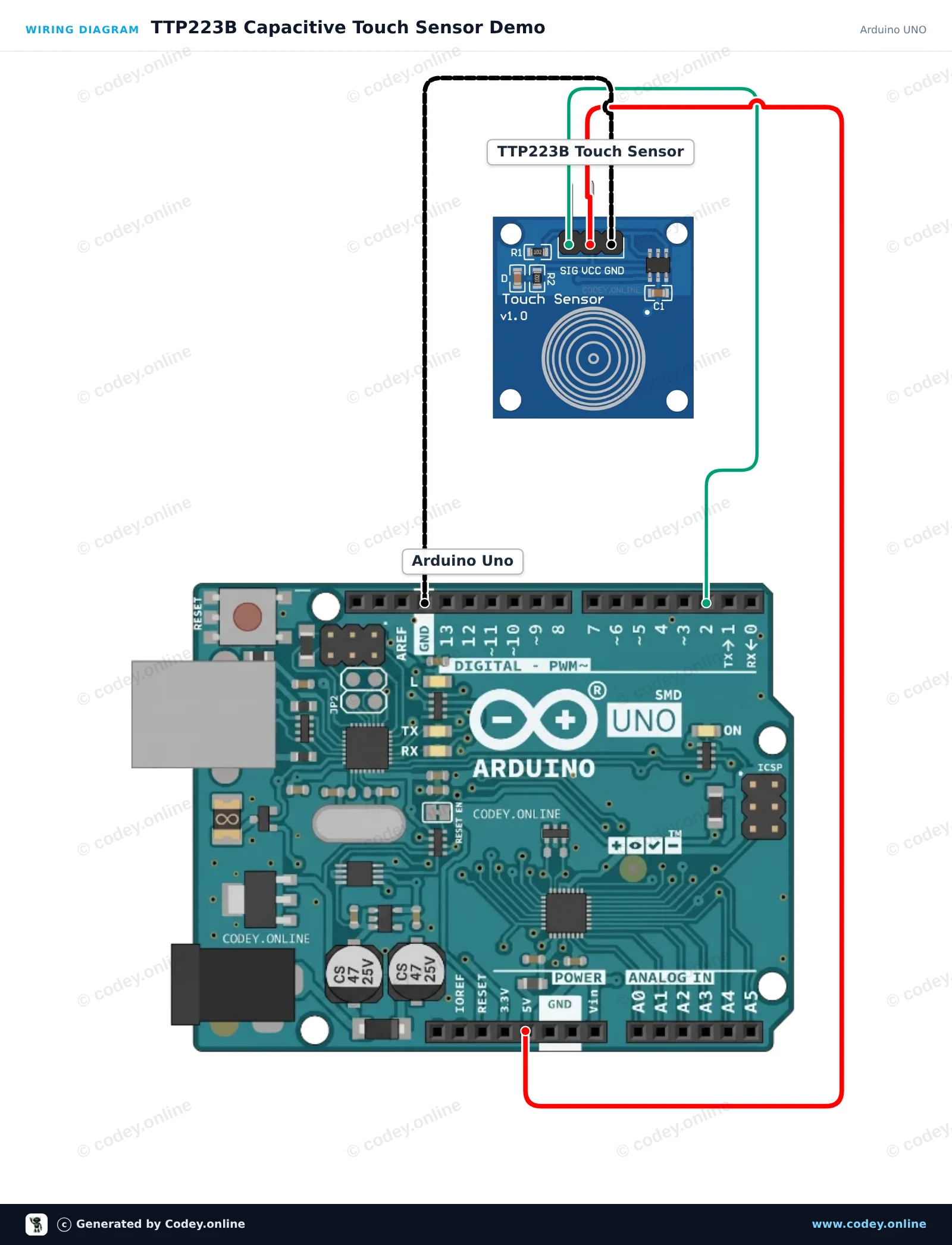
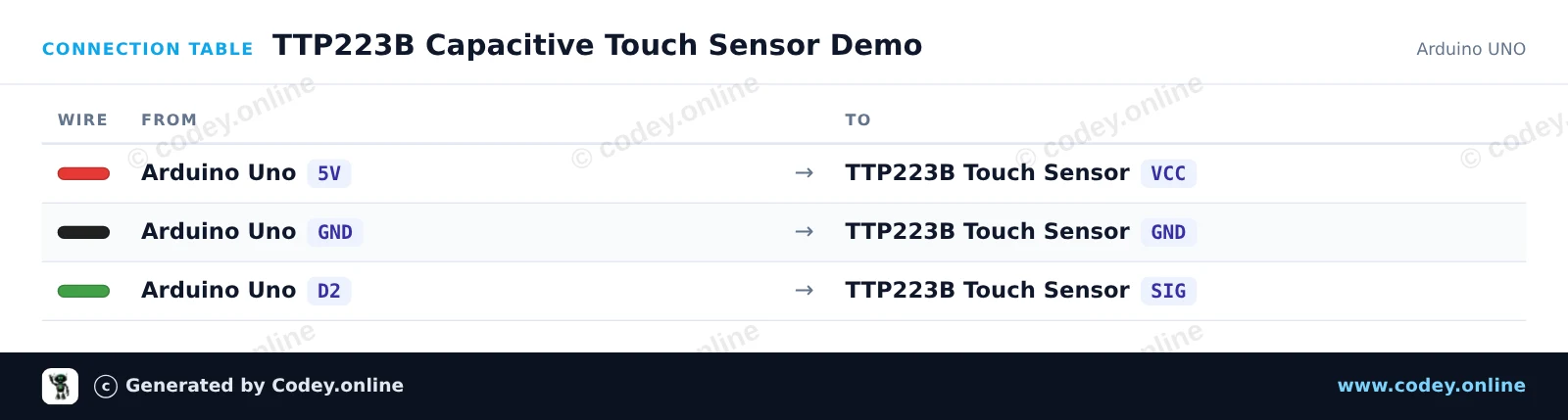
Así conectas el Sensor táctil TTP223B a un Arduino UNO o ESP32, con un sketch de ejemplo que puedes subir directamente.
Este proyecto muestra el módulo sensor táctil capacitivo TTP223B. Cuando tocas la superficie de detección capacitiva, el sensor emite una señal HIGH que enciende el LED integrado de Arduino e imprime el estado en el Serial Monitor.
/*
 * ==================================================================
 *  Generated by Codey.online  —  https://www.codey.online
 * ==================================================================
 *  Project   : TTP223B Capacitive Touch Sensor Demo
 *  Board     : Arduino UNO (arduino:avr:uno)
 *  Parts     : Touch sensor TTP223B
 *  Libraries : none (built-in)
 *
 *  Codey Online is an AI-powered browser IDE for Arduino and ESP32.
 *  Describe your project and Codey writes the code, draws the wiring
 *  diagram and uploads it to your board, straight from the browser.
 *  This code is free to use, modify and share, without warranty.
 * ==================================================================
 */

// Pin definitions
const int touchPin = 2;
const int ledPin = 13;

int lastState = LOW;

void setup() {
  pinMode(touchPin, INPUT);
  pinMode(ledPin, OUTPUT);

  Serial.begin(115200);
  Serial.println(F("TTP223B Touch Sensor Initialized"));
}

void loop() {
  int touchState = digitalRead(touchPin);

  // Control onboard LED based on touch input
  digitalWrite(ledPin, touchState);

  // Print message on state change
  if (touchState != lastState) {
    if (touchState == HIGH) {
      Serial.println(F("Touch detected!"));
    } else {
      Serial.println(F("Touch released."));
    }
    lastState = touchState;
  }

  delay(20);
}Wiring diagram and example code generated by Codey.online — https://www.codey.online
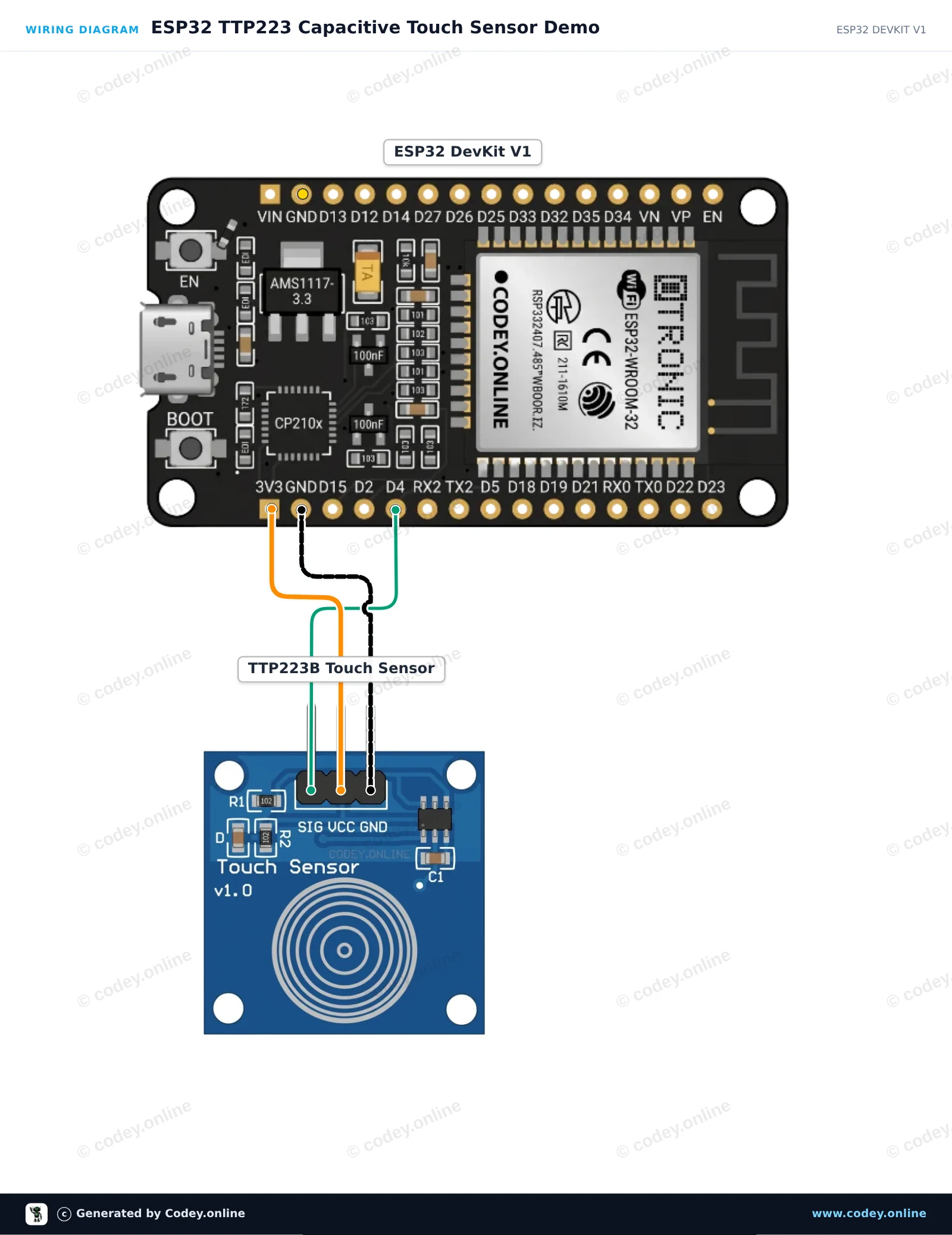
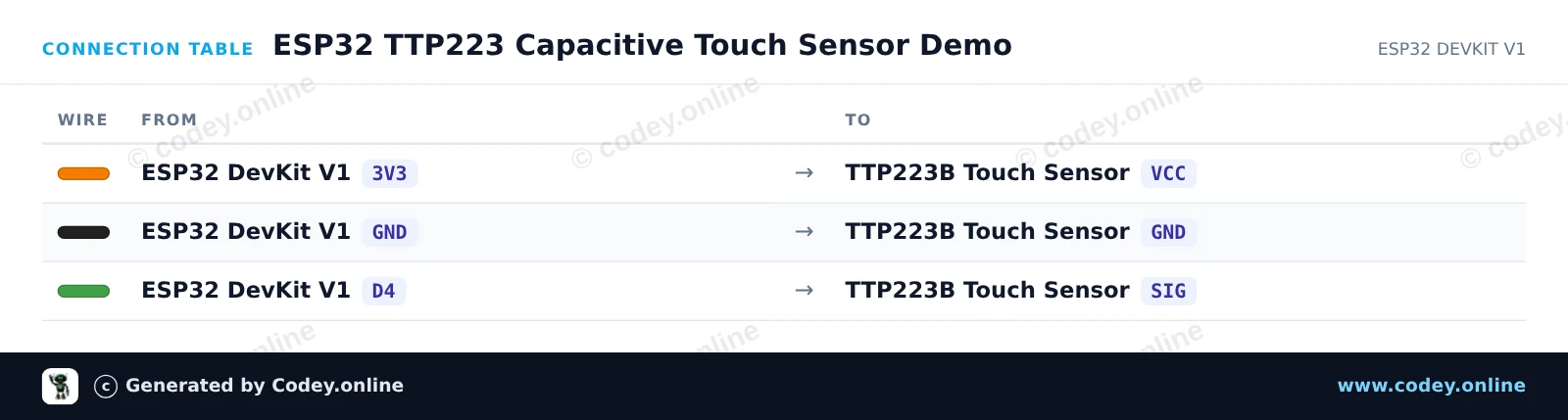
Este circuito lee señales digitales del sensor táctil capacitivo TTP223 y refleja el estado en el LED integrado del ESP32. Cuando tocas la almohadilla del sensor, el pin de señal pasa a HIGH, iluminando el LED onboard e imprimiendo los eventos de toque en el Serial Monitor. El módulo se alimenta directamente con 3.3V para una compatibilidad lógica segura.
/*
 * ==================================================================
 *  Generated by Codey.online  —  https://www.codey.online
 * ==================================================================
 *  Project   : ESP32 TTP223 Capacitive Touch Sensor Demo
 *  Board     : ESP32 DEVKIT V1 (esp32:esp32:esp32doit-devkit-v1)
 *  Parts     : Touch sensor TTP223B
 *  Libraries : none (built-in)
 *
 *  Codey Online is an AI-powered browser IDE for Arduino and ESP32.
 *  Describe your project and Codey writes the code, draws the wiring
 *  diagram and uploads it to your board, straight from the browser.
 *  This code is free to use, modify and share, without warranty.
 * ==================================================================
 */

const int TOUCH_PIN = 4;   // D4 on ESP32 DevKit V1
const int LED_PIN   = 2;   // Onboard LED on ESP32 DevKit V1

int lastState = LOW;

void setup() {
  Serial.begin(115200);
  pinMode(TOUCH_PIN, INPUT);
  pinMode(LED_PIN, OUTPUT);
  digitalWrite(LED_PIN, LOW);
  Serial.println("TTP223 Touch Sensor Initialized.");
}

void loop() {
  int touchState = digitalRead(TOUCH_PIN);

  if (touchState != lastState) {
    if (touchState == HIGH) {
      digitalWrite(LED_PIN, HIGH);
      Serial.println("Touch detected!");
    } else {
      digitalWrite(LED_PIN, LOW);
      Serial.println("Touch released.");
    }
    lastState = touchState;
    delay(50); // Simple debounce delay
  }
}Wiring diagram and example code generated by Codey.online — https://www.codey.online





 English
  Nederlands
  Frans
Frans  Deutsch
  Italiano
  Suomi
Suomi  Polski
  Dansk
Dansk  Ελληνικά
  Български
  Čeština
  Hrvatski
  Svenska
  Aileen