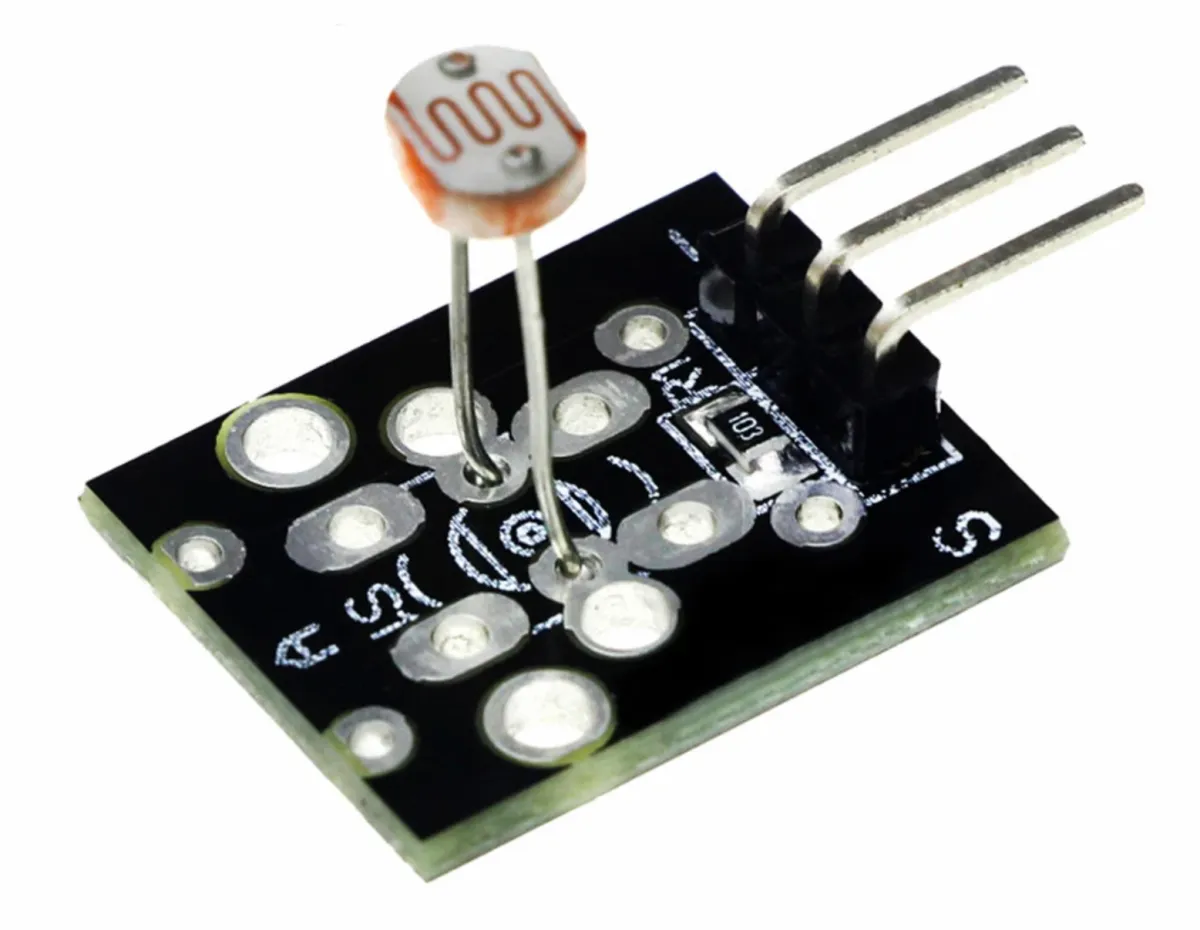
SKU: OT8342 Número de artículo: AB028 EAN: 8720828223451

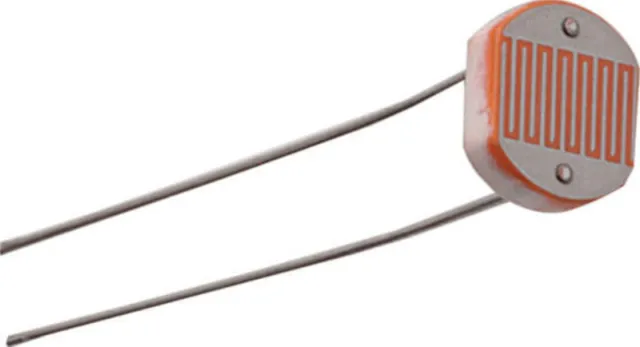
LDR es la abreviatura de Light Dependent Resistor. Un LDR es una fotorresistencia, es decir, una resistencia que cambia su resistencia en respuesta a los cambios en el nivel de luz al que está expuesta. Cuando incide más luz sobre el LDR, la resistencia disminuye, y cuando hay menos luz, la resistencia aumenta. Esta propiedad hace que el LDR sea adecuado para aplicaciones como circuitos fotosensibles y automatización.
Se puede usar tanto para Arduino como para ESP32, ESP8266, Rapberry Pi, Pi Pico y también en circuitos sin microcontrolador.
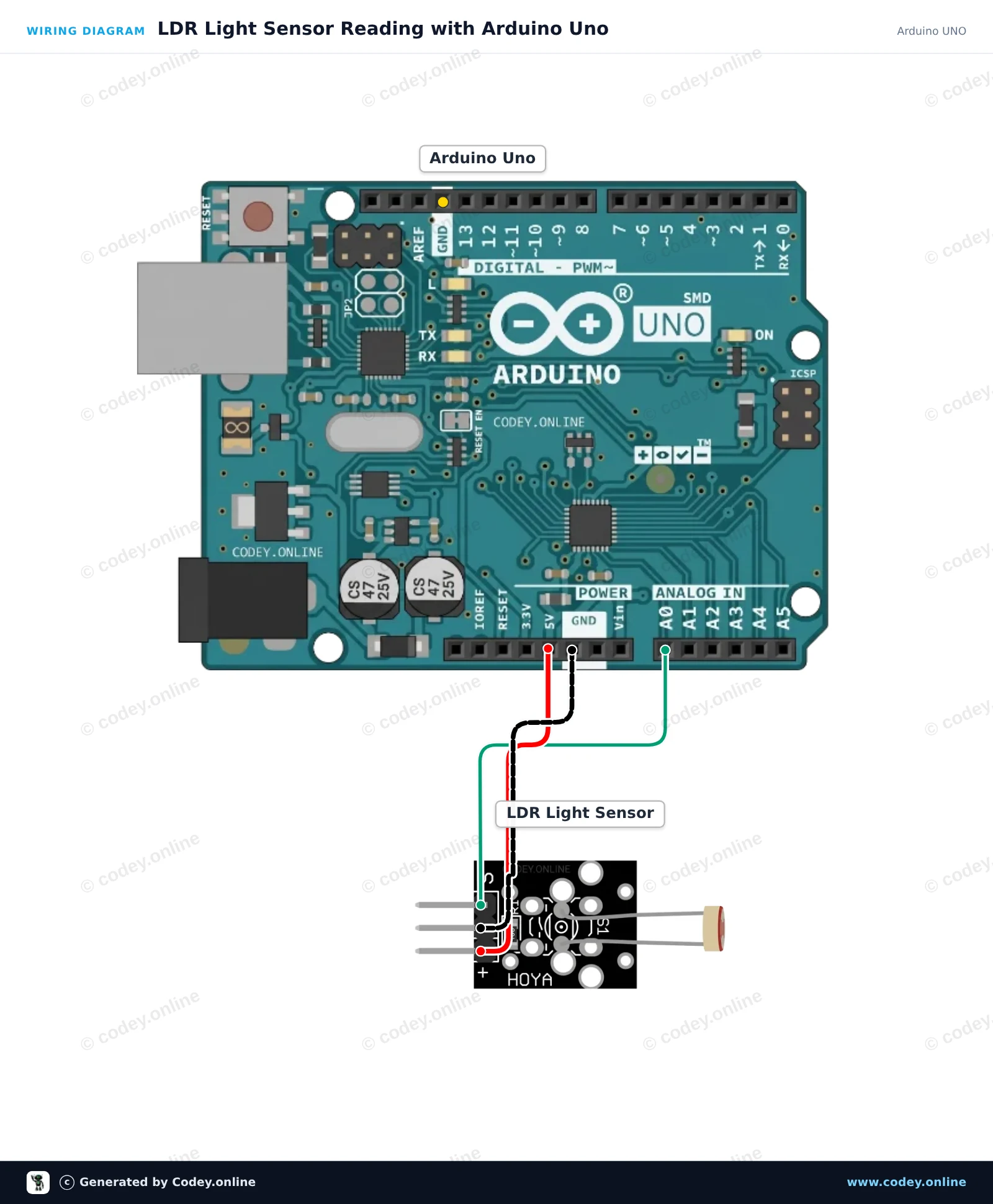
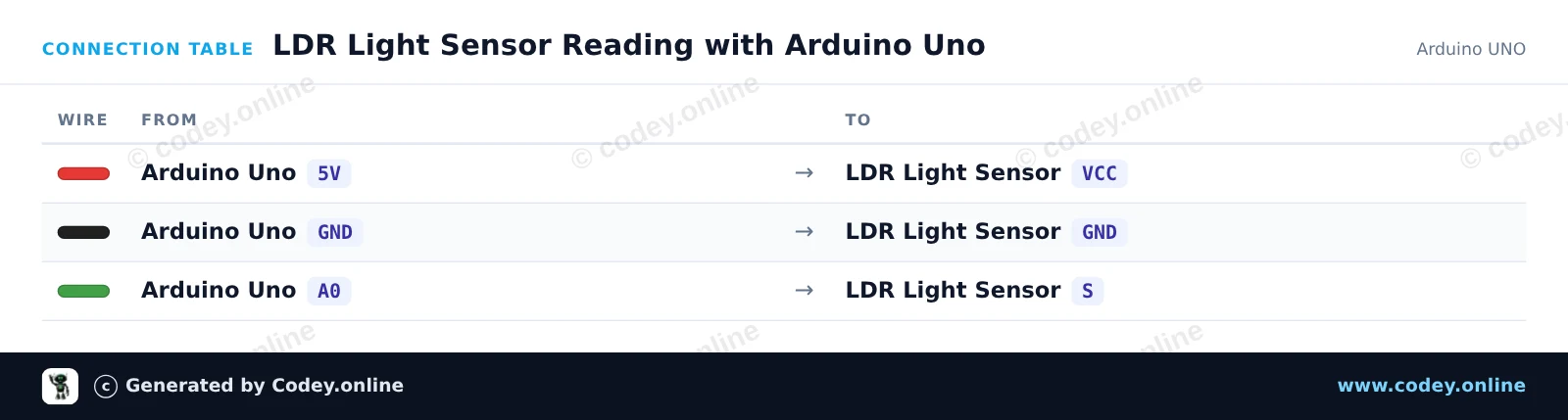
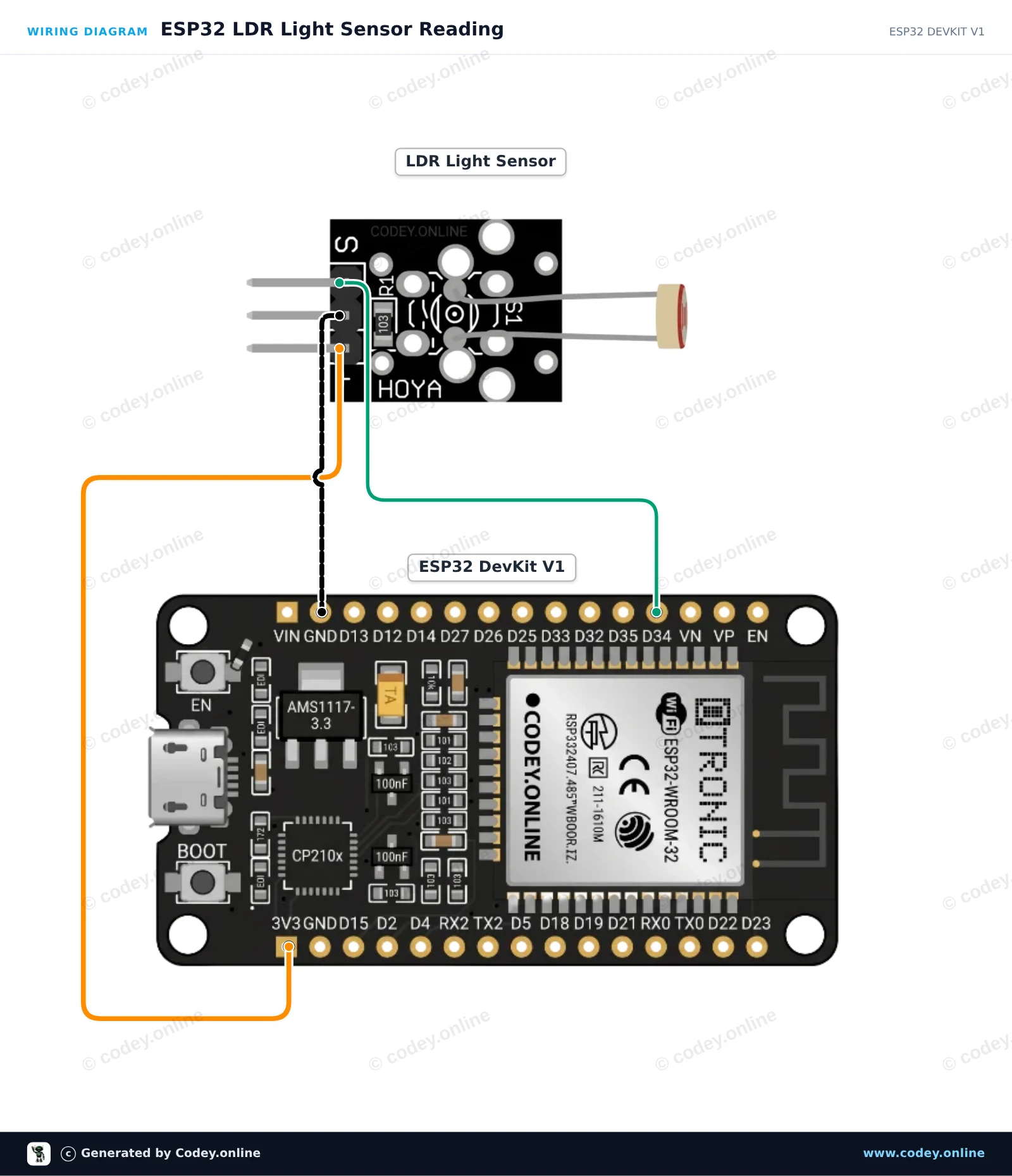
Así conectas el Módulo sensor LDR fotosensible a un Arduino UNO o ESP32, con un sketch de ejemplo que puedes subir directamente.
Este proyecto mide el nivel de luz ambiental usando un módulo sensor de luz LDR conectado a la entrada analógica A0 de Arduino Uno. Arduino lee la tensión analógica, mapea la intensidad de la luz y muestra la lectura en bruto en el Serial Monitor. Al cubrir el sensor, la lectura cambia en tiempo real.
/*
 * ==================================================================
 *  Generated by Codey.online  —  https://www.codey.online
 * ==================================================================
 *  Project   : LDR Light Sensor Reading with Arduino Uno
 *  Board     : Arduino UNO (arduino:avr:uno)
 *  Parts     : LDR Light Sensor Module
 *  Libraries : none (built-in)
 *
 *  Codey Online is an AI-powered browser IDE for Arduino and ESP32.
 *  Describe your project and Codey writes the code, draws the wiring
 *  diagram and uploads it to your board, straight from the browser.
 *  This code is free to use, modify and share, without warranty.
 * ==================================================================
 */

const int ldrPin = A0;
const int ledPin = 13;

void setup() {
  Serial.begin(115200);
  pinMode(ledPin, OUTPUT);
  Serial.println(F("LDR Light Sensor Initialized"));
}

void loop() {
  int rawValue = analogRead(ldrPin);
  float voltage = rawValue * (5.0 / 1023.0);

  Serial.print(F("Raw: "));
  Serial.print(rawValue);
  Serial.print(F(" | Voltage: "));
  Serial.print(voltage, 2);
  Serial.print(F(" V | Status: "));

  // Turn on built-in LED if light level drops below threshold
  if (rawValue < 400) {
    digitalWrite(ledPin, HIGH);
    Serial.println(F("Dark (LED ON)"));
  } else {
    digitalWrite(ledPin, LOW);
    Serial.println(F("Bright (LED OFF)"));
  }

  delay(300);
}Wiring diagram and example code generated by Codey.online — https://www.codey.online
Este proyecto muestra cómo leer los niveles de luz ambiental usando un módulo sensor de luz LDR conectado al ESP32. El módulo entrega un voltaje analógico proporcional a la intensidad de la luz, que se lee mediante GPIO 34. Abre el Monitor Serie a 115200 baud para ver las lecturas de luz en tiempo real.
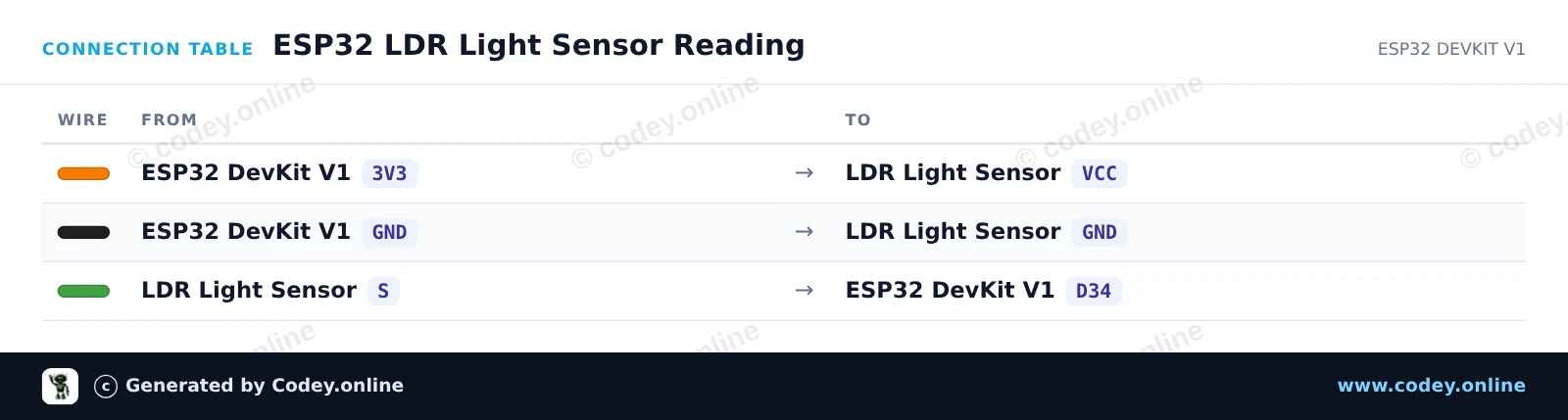
/*
 * ==================================================================
 *  Generated by Codey.online  —  https://www.codey.online
 * ==================================================================
 *  Project   : ESP32 LDR Light Sensor Reading
 *  Board     : ESP32 DEVKIT V1 (esp32:esp32:esp32doit-devkit-v1)
 *  Parts     : LDR Light Sensor Module
 *  Libraries : none (built-in)
 *
 *  Codey Online is an AI-powered browser IDE for Arduino and ESP32.
 *  Describe your project and Codey writes the code, draws the wiring
 *  diagram and uploads it to your board, straight from the browser.
 *  This code is free to use, modify and share, without warranty.
 * ==================================================================
 */

// LDR Light Sensor Demo for ESP32
const int LDR_PIN = 34;

void setup() {
  Serial.begin(115200);
  delay(1000);
  Serial.println("ESP32 LDR Light Sensor Demo");
}

void loop() {
  // Read the analog value (0 - 4095 on ESP32 12-bit ADC)
  int rawValue = analogRead(LDR_PIN);

  // Convert to approximate percentage
  float percentage = (rawValue / 4095.0) * 100.0;

  Serial.print("Raw ADC: ");
  Serial.print(rawValue);
  Serial.print(" | Light Level: ");
  Serial.print(percentage, 1);
  Serial.println("%");

  delay(500);
}Wiring diagram and example code generated by Codey.online — https://www.codey.online





 English
  Nederlands
  Frans
Frans  Deutsch
  Italiano
  Suomi
Suomi  Polski
  Dansk
Dansk  Ελληνικά
  Български
  Čeština
  Hrvatski
  Aileen